
Kamaji, Cluster API and etcd
OR: How to build your own managed Kubernetes service
Updated
On this page
In the final part of this series, we are building on the shoulders of giants: Cluster API, etcd and Kamaji.
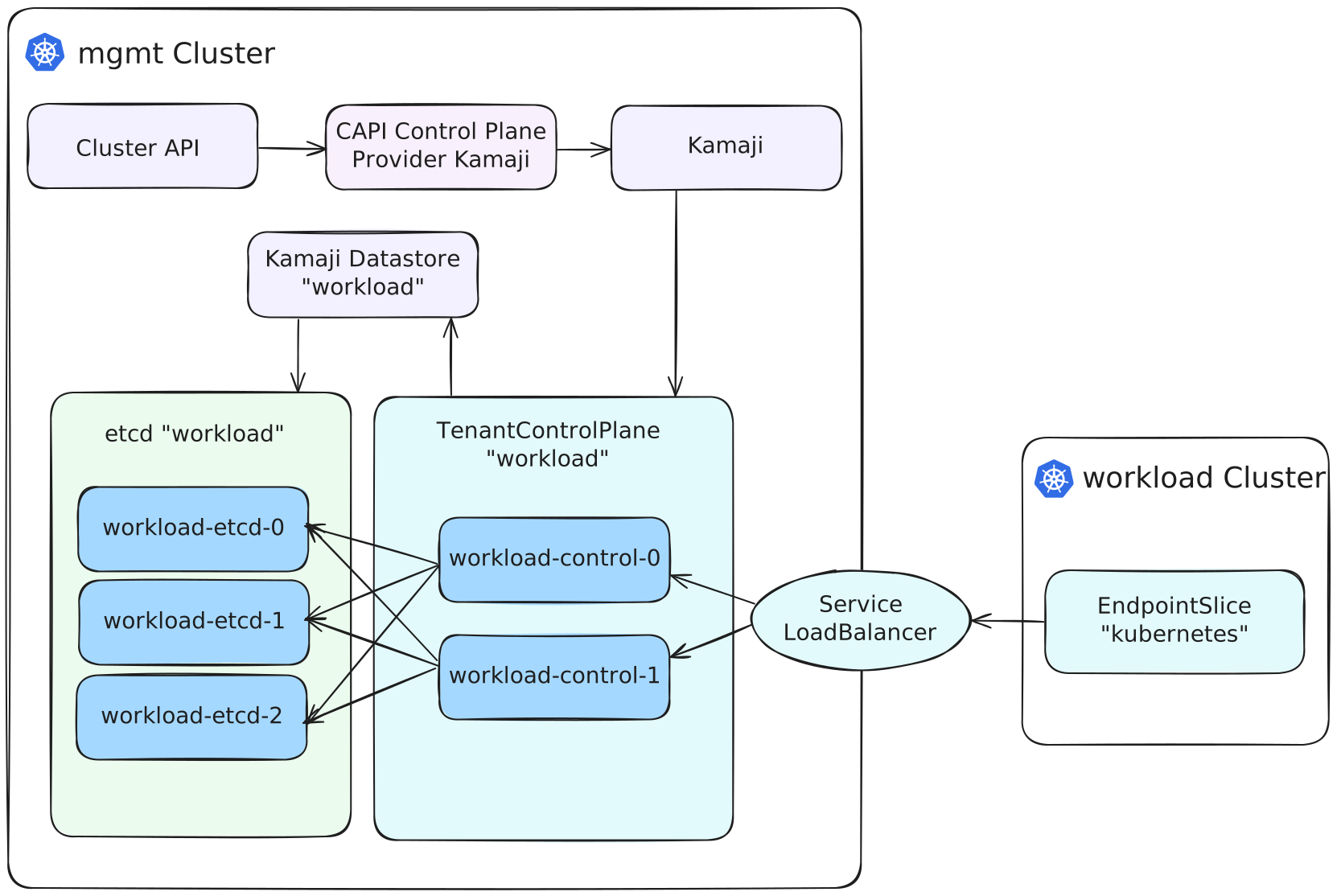
The goal here is to get a managed Kubernetes service like experience, where you don't see the control plane nodes in your workload clusters. And to optimize resource bin packing, the control planes run in Pods rather than on separate machines — the same applies to etcd.
So before we get started, what's in it for you in this blog post series?
Part 1: "Build conformant Cluster API Node Images for Hetzner Cloud"
- Create conformant Cluster API images for Hetzner Cloud with kubernetes-sigs/image-builder
- Flatcar and Ubuntu Linux
Part 2: "Deploy Cluster API Operator and Providers with Flux"
- Deploy Cluster API Operator
- Deploy Custom Resources (CAPI Providers)
Part 3: "Dive into Cluster API, ClusterClass and CAPH"
- Overview of all CAPI related resources and templates
- Deployment of highly available, multi-region Kubernetes Cluster with Cluster API
- Usage of Cluster API ClusterClass as a template for your Hetzner Cloud Clusters
Part 4: (you are here)
- Deploy Kamaji and run your control plane as Pods
- Deploy the Kamaji Control Plane provider for Cluster API
- Create etcds with kamaji-etcd
etcd
Remember, our goal is to have a managed Kubernetes service experience. This means we also want to automate etcd creation and use compute resources as efficiently as possible.
In Part 3 of the series, we deployed control plane + etcd on separate instances on Hetzner Cloud.
Now, we are going to deploy both as Pods in our management cluster. We will start with etcd. In another blog post (coming soon™) I will discuss a few etcd operators / solutions I tested and why I've chosen kamaji-etcd for now.
So at the start, add the Clastix Helm repository for Flux:
apiVersion: source.toolkit.fluxcd.io/v1
kind: HelmRepository
metadata:
  name: clastix
spec:
  url: https://clastix.github.io/charts
kamaji
First, a big shoutout to the people at Clastix who build Kamaji 👏. Fantastic work!
With Kamaji its possible to let your control plane run as Pods, similar to Gardener. And there is also a handy CAPI provider so you can replace the kubeadm control plane provider and let Kamaji manage it instead.
Deploy Kamaji
Since July 2024, Clastix no longer releases stable release artifacts.
This results in the need to deploy either the latest image tag (don't) or a monthly edge release published in the kamaji GitHub repo.
Then deploy a HelmRelease for Kamaji:
apiVersion: helm.toolkit.fluxcd.io/v2
kind: HelmRelease
metadata:
  name: kamaji
spec:
  interval: 5m
  chart:
    spec:
      chart: charts/kamaji
      version: "0.0.0+latest"
      sourceRef:
        kind: HelmRepository
        name: kamaji
  values:
    image:
      tag: edge-25.9.5
    kamaji-etcd:
      replicas: 1
This deploys not only kamaji, but kamaji-etcd and a default datastore as well. The default datastore is required by kamaji and acts as fallback if none is set. As we are intending to not use it at all, we configure only one replica to save resources.
For every cluster we want to deploy, we are going to use a separate etcd instance and Kamaji datastore which helps in seperation of concerns and also should make backup/restore procedures as smooth as possible.
Deploy CAPI Kamaji Provider
Now we have Kamaji and a default datastore up and running. Next, we need the Kamaji control plane provider for Cluster API.
If you followed along Part 3 of the series, you should already have cluster-api-operator up and running.
Adding the kamaji provider then is as simple as adding a new resource to your Kubernetes cluster:
apiVersion: operator.cluster.x-k8s.io/v1alpha2
kind: ControlPlaneProvider
metadata:
  name: kamaji
spec:
  version: v0.14.2
  deployment:
    replicas: 2
    affinity:
      podAntiAffinity:
        preferredDuringSchedulingIgnoredDuringExecution:
          - weight: 100
            podAffinityTerm:
              labelSelector:
                matchExpressions:
                  - key: cluster.x-k8s.io/provider
                    operator: In
                    values:
                      - kamaji
              topologyKey: topology.kubernetes.io/zone
    containers:
      - name: manager
        args:
"--zap-encoder": "json"- Deploy kamaji controlplane controller ("capi-kamaji-controller")
- Check version in the kamaji cluster api repo: clastix/cluster-api-control-plane-provider-kamaji
- Set two replicas
- Set Pod anti-affinity to spread them across multiple zones
- Enable JSON logging (structured logs FTW)
Modify KubeadmConfigTemplate
We can use the same KubeAdmConfigTemplate from Part 3 with only some minor enhancement to add the DNS configuration - otherwise Cilium can't mount /etc/kubernete/resolv.conf.
apiVersion: bootstrap.cluster.x-k8s.io/v1beta1
kind: KubeadmConfigTemplate
metadata:
  name: kubeadm-config-0.1.0
spec:
  template:
    spec:
      format: ignition # remove when using Ubuntu
      files:
        - path: /etc/kubernetes/resolv.conf
          owner: "root:root"
          permissions: "0744"
          content: |
            nameserver 185.12.64.1
            nameserver 185.12.64.2
            nameserver 2a01:4ff:ff00::add:1
      joinConfiguration:
        nodeRegistration:
          kubeletExtraArgs:
            anonymous-auth: "false"
            authentication-token-webhook: "true"
            authorization-mode: Webhook
            cloud-provider: external
            event-qps: "5"
            kubeconfig: /etc/kubernetes/kubelet.conf
            max-pods: "110"
            read-only-port: "0"
            rotate-server-certificates: "true"
            tls-cipher-suites: TLS_ECDHE_ECDSA_WITH_AES_128_GCM_SHA256,TLS_ECDHE_RSA_WITH_AES_128_GCM_SHA256,TLS_ECDHE_ECDSA_WITH_AES_256_GCM_SHA384,TLS_ECDHE_RSA_WITH_AES_256_GCM_SHA384
            tls-min-version: VersionTLS12
Modify HetznerClusterTemplate
We also need to modify our HetznerClusterTemplate we have discussed in Part 3.
Below you can see the old template and the lines we need to change:
apiVersion: infrastructure.cluster.x-k8s.io/v1beta1
kind: HetznerClusterTemplate
metadata:
  name: hetzner-kamaji-0.1.0
spec:
  template:
    spec:
      controlPlaneEndpoint:
        host: ""
        port: 443
      controlPlaneLoadBalancer:
        region: fsn1
      controlPlaneRegions:
        - fsn1
        - hel1
        - nbg1
      hcloudNetwork:
        enabled: true
        networkZone: eu-central
      hcloudPlacementGroups:
        - name: control-plane
          type: spread
        - name: worker
          type: spread
      hetznerSecretRef:
        key:
          hcloudToken: hcloud
        name: hetzner
      sshKeys:
        hcloud:
          - name: id_ed25519
First, the creation and management of the control plane Load Balancer will now be delegated away from CAPH --> Kamaji, so we disabled it with .spec.template.spec.controlPlaneLoadBalancer.enabled = false.
Because of this we also disable the regions for the control plane as this is now handled by Kamaji as well. Then we do some cleanup and remove the "control-plane" HCloud Placement Group which we don't need anymore at all.
At last we add an important annotations allow-empty-control-plane-address at .spec.template.metadata.annotations
to tell CAPH that we are externally managing the control planes (--> Kamaji).
(You can see the full updated manifest further below.)
Modify ClusterClass
Additional modifications are required for our ClusterClass as well.
I highlighted the lines which need to be modified:
apiVersion: cluster.x-k8s.io/v1beta1
kind: ClusterClass
metadata:
  name: hetzner-kamaji-test-0.1.0
spec:
  ... rest of the config ...
  variables:
    - name: imageName
      required: true
      schema:
        openAPIV3Schema:
          type: string
    - name: instanceType
      required: true
      schema:
        openAPIV3Schema:
          type: string
  patches:
    - name: control-plane
      definitions:
        - jsonPatches:
            - op: replace
              path: /spec/template/spec/imageName
              valueFrom:
                variable: imageName
            - op: replace
              path: /spec/template/spec/type
              valueFrom:
                variable: instanceType
          selector:
            apiVersion: infrastructure.cluster.x-k8s.io/v1beta1
            kind: HCloudMachineTemplate
            matchResources:
              controlPlane: true
  controlPlane:
    ref:
      apiVersion: controlplane.cluster.x-k8s.io/v1beta1
      kind: KubeadmControlPlaneTemplate
      name: kubeadm-control-plane-0.1.0
    machineInfrastructure:
      ref:
        apiVersion: infrastructure.cluster.x-k8s.io/v1beta1
        kind: HCloudMachineTemplate
        name: control-plane-0.1.0
  ... rest of the config ...
First we need to update our variables we want to use:
- add a new one to set the Kamaji Datastore (
dataStoreName) - and the location of the Kube API LB (
hcloudLoadBalancerLocation)
apiVersion: cluster.x-k8s.io/v1beta1
kind: ClusterClass
metadata:
  name: hetzner-kamaji-test-0.1.0
spec:
  ... rest of the config ...
  variables:
    - name: dataStoreName
      required: true
      schema:
        openAPIV3Schema:
          type: string
    - name: hcloudLoadBalancerLocation
      required: true
      schema:
        openAPIV3Schema:
          type: string
    - name: imageName
      required: true
      schema:
        openAPIV3Schema:
          type: string
    - name: instanceType
      required: true
      schema:
        openAPIV3Schema:
          type: string
... rest of the config ...Next step is to configure our JSON patch definitions for those two variables by replacing the old ones. The annotation patch needs a special notation (~1) to set the path for the slash.
apiVersion: cluster.x-k8s.io/v1beta1
kind: ClusterClass
metadata:
  name: hetzner-kamaji-0.1.0
spec:
  ... rest of the config ...
    - name: control-plane
      definitions:
        - selector:
            apiVersion: controlplane.cluster.x-k8s.io/v1alpha1
            kind: KamajiControlPlaneTemplate
            matchResources:
              controlPlane: true
          jsonPatches:
            - op: replace
              path: /spec/template/spec/dataStoreName
              valueFrom:
                variable: dataStoreName
            - op: replace
              path: /spec/template/spec/network/serviceAnnotations/load-balancer.hetzner.cloud~1location
              valueFrom:
                variable: hcloudLoadBalancerLocation
  controlPlane:
    ref:
  ... rest of the config ...
Our last modification will be replacing the control plane provider: previously we used kubeadm, but now we tell CAPI to use Kamaji.
And therefor we don't need the machine infrastrucutre and HCloudMachineTemplate for the control plane anymore, so .spec.controlPlane.machineInfrastructure is removed completely.
apiVersion: cluster.x-k8s.io/v1beta1
kind: ClusterClass
metadata:
  name: hetzner-kamaji-0.1.0
spec:
  ... rest of the config ...
  controlPlane:
    ref:
      apiVersion: controlplane.cluster.x-k8s.io/v1beta1
      kind: KamajiControlPlaneTemplate
      name: hetzner-kamaji-0.1.0
  ... rest of the config ...
Bringing it all together
Now that we have everything set up, we will deploy our first Cluster-API Kamaji based cluster and its etcd.
etcd & Kamaji Datastore
The kamaji-etcd Helm Chart bundles everything we need for a working etcd to be used with Kamaji:
- required certificates
- etcd StatefulSet
- Kamaji Datastore
So with Flux you would deploy your etcd with a HelmRelease similar to this:
apiVersion: helm.toolkit.fluxcd.io/v2
kind: HelmRelease
metadata:
  name: test-etcd
spec:
  interval: 5m
  chart:
    spec:
      chart: kamaji-etcd
      version: 0.9.4
      sourceRef:
        kind: HelmRepository
        name: clastix
  driftDetection:
    mode: enabled
  values:
    replicas: 3
    persistentVolumeClaim:
      size: 10Gi
    resources:
      limits:
        cpu: "1"
        memory: "1Gi"
      requests:
        cpu: "100m"
        memory: "200Mi"
    topologySpreadConstraints:
    - maxSkew: 1
      topologyKey: topology.kubernetes.io/zone
      whenUnsatisfiable: DoNotSchedule
      labelSelector:
        matchLabels:
          application: kamaji-etcd
    datastore:
      enabled: true
      name: test-etcd
We set three replicas (quorum) for high availability, spread the Pods across multiple zones and attach a 10GB volume for persistent storage. Resources are set to burstable QoS and we create a Kamaji Datastore which points to the etcd instance.
KamajiControlPlaneTemplate
So what does the controlplane template for Kamaji look like? Below is a simple, basic but working example.
The datastoreName and serviceAnnotation for the location will be replaced with our variables defined in the ClusterClass.
apiVersion: controlplane.cluster.x-k8s.io/v1alpha1
kind: KamajiControlPlaneTemplate
metadata:
  name: hetzner-kamaji-0.1.0
spec:
  template:
    spec:
      deployment:
        topologySpreadConstraints:
          - maxSkew: 1
            topologyKey: topology.kubernetes.io/zone
            whenUnsatisfiable: DoNotSchedule
            labelSelector:
              matchLabels:
                component.kamaji.clastix.io/datastore: test-etcd
                kamaji.clastix.io/component: deployment
      apiServer:
        extraArgs:
          - --cloud-provider=external
        resources:
          requests:
            cpu: "250m"
            memory: "1Gi"
      controllerManager:
        extraArgs:
          - --cloud-provider=external
        resources:
          requests:
            cpu: "100m"
            memory: "100Mi"
      scheduler:
        resources:
          requests:
            cpu: "100m"
            memory: "100Mi"
      dataStoreName: PLACEHOLDER-etcd
      addons:
        coreDNS: {}
        kubeProxy: {}
        konnectivity: {}
      kubelet:
        cgroupfs: systemd
        preferredAddressTypes:
          - ExternalIP
          - Hostname
          - InternalDNS
          - ExternalDNS
      network:
        serviceType: LoadBalancer
        serviceAnnotations:
          load-balancer.hetzner.cloud/location: fsn1
          load-balancer.hetzner.cloud/name: test-kube-api-kamaji
Again we are spreading the control plane Pods across multiple zones and tell Kubernetes we are using an external cloud controller manager (on Hetzner its the HCCM).
Also we configure some sane resource requests - in a production environment you may want to additionally configure HPA and/or VPA depending on your needs.
KubeadmConfigTemplate
Now apply the updated kubeadm config template where we have added the DNS configuration in resolv.conf:
apiVersion: bootstrap.cluster.x-k8s.io/v1beta1
kind: KubeadmConfigTemplate
metadata:
  name: kubeadm-config-0.1.0
spec:
  template:
    spec:
      format: ignition # remove when using Ubuntu
      files:
        - path: /etc/kubernetes/resolv.conf
          owner: "root:root"
          permissions: "0744"
          content: |
            nameserver 185.12.64.1
            nameserver 185.12.64.2
            nameserver 2a01:4ff:ff00::add:1
      joinConfiguration:
        nodeRegistration:
          kubeletExtraArgs:
            anonymous-auth: "false"
            authentication-token-webhook: "true"
            authorization-mode: Webhook
            cloud-provider: external
            event-qps: "5"
            kubeconfig: /etc/kubernetes/kubelet.conf
            max-pods: "110"
            read-only-port: "0"
            rotate-server-certificates: "true"
            tls-cipher-suites: TLS_ECDHE_ECDSA_WITH_AES_128_GCM_SHA256,TLS_ECDHE_RSA_WITH_AES_128_GCM_SHA256,TLS_ECDHE_ECDSA_WITH_AES_256_GCM_SHA384,TLS_ECDHE_RSA_WITH_AES_256_GCM_SHA384
            tls-min-version: VersionTLS12
HetznerClusterTemplate
The updated version which supports Kamaji:
apiVersion: infrastructure.cluster.x-k8s.io/v1beta1
kind: HetznerClusterTemplate
metadata:
  name: hetzner-kamaji-0.1.0
spec:
  template:
    metadata:
      annotations:
        capi.syself.com/allow-empty-control-plane-address: "true"
    spec:
      controlPlaneEndpoint:
        host: ""
        port: 443
      controlPlaneLoadBalancer:
        enabled: false
      controlPlaneRegions: []
      hcloudNetwork:
        enabled: true
        networkZone: eu-central
      hcloudPlacementGroups:
        - name: worker
          type: spread
      hetznerSecretRef:
        key:
          hcloudToken: hcloud
        name: hetzner
      sshKeys:
        hcloud:
          - name: id_ed25519 # replace with your HCloud SSH Key name
ClusterClass
And over to the complete (and adapted from Part 3) ClusterClass resources for Kamaji:
apiVersion: cluster.x-k8s.io/v1beta1
kind: ClusterClass
metadata:
  name: hetzner-kamaji-test-0.1.0
spec:
  variables:
    - name: dataStoreName
      required: true
      schema:
        openAPIV3Schema:
          description: "Name of the Kamaji DataStore (e.g., etcd-cluster)."
          type: string
    - name: hcloudLoadBalancerLocation
      required: true
      schema:
        openAPIV3Schema:
          description: "Hetzner Cloud location for the Kamaji kube-api LoadBalancer (e.g., fsn1, nbg1, hel1)."
          type: string
    - name: imageName
      required: true
      schema:
        openAPIV3Schema:
          description: "OS Image name or Snapshot caph-image-name label."
          type: string
    - name: instanceType
      required: true
      schema:
        openAPIV3Schema:
          description: "Hetzner server type for worker nodes (e.g., cax11, cx21, cpx21)."
          type: string
  patches:
    - name: worker
      definitions:
        - selector:
            apiVersion: infrastructure.cluster.x-k8s.io/v1beta1
            kind: HCloudMachineTemplate
            matchResources:
              machineDeploymentClass:
                names:
                  - worker
          jsonPatches:
            - op: replace
              path: /spec/template/spec/imageName
              valueFrom:
                variable: imageName
            - op: replace
              path: /spec/template/spec/type
              valueFrom:
                variable: instanceType
    - name: kamaji
      definitions:
        - selector:
            apiVersion: controlplane.cluster.x-k8s.io/v1alpha1
            kind: KamajiControlPlaneTemplate
            matchResources:
              controlPlane: true
          jsonPatches:
            - op: replace
              path: /spec/template/spec/dataStoreName
              valueFrom:
                variable: dataStoreName
            - op: replace
              path: /spec/template/spec/network/serviceAnnotations/load-balancer.hetzner.cloud~1location
              valueFrom:
                variable: hcloudLoadBalancerLocation
  controlPlane:
    ref:
      apiVersion: controlplane.cluster.x-k8s.io/v1alpha1
      kind: KamajiControlPlaneTemplate
      name: hetzner-kamaji-0.1.0
  infrastructure:
    ref:
      apiVersion: infrastructure.cluster.x-k8s.io/v1beta1
      kind: HetznerClusterTemplate
      name: hetzner-kamaji-0.1.0
  workers:
    machineDeployments:
      - class: worker
        failureDomain: fsn1
        template:
          bootstrap:
            ref:
              apiVersion: bootstrap.cluster.x-k8s.io/v1beta1
              kind: KubeadmConfigTemplate
              name: kubeadm-config-0.1.0
          infrastructure:
            ref:
              apiVersion: infrastructure.cluster.x-k8s.io/v1beta1
              kind: HCloudMachineTemplate
              name: worker-0.1.0
        machineHealthCheck:
          maxUnhealthy: "40%"
          nodeStartupTimeout: 15m
          remediationTemplate:
            apiVersion: infrastructure.cluster.x-k8s.io/v1beta1
            kind: HCloudRemediationTemplate
            name: hrt-0.1.0
          unhealthyConditions:
            - status: Unknown
              timeout: 180s
              type: Ready
            - status: "False"
              timeout: 180s
              type: Ready
Cluster
Finally, we deploy our actual Cluster, which references the above ClusterClass and uses Kamaji as the control plane provider.
apiVersion: cluster.x-k8s.io/v1beta1
kind: Cluster
metadata:
  name: test-kamaji
  labels:
    cloud: hetzner
    cni: cilium
    gitops: flux
spec:
  clusterNetwork:
    pods:
      cidrBlocks:
        - 10.200.0.0/16
    services:
      cidrBlocks:
        - 10.96.0.0/12
  topology:
    variables:
      - name: dataStoreName
        value: test-etcd
      - name: hcloudLoadBalancerLocation
        value: fsn1
      - name: imageName
        value: cluster-api-flatcar-stable-4152.2.2-v1.32.4-1745486387 # replace with your image name
      - name: instanceType
        value: cax21
    class: hetzner-kamaji-test-0.1.0
    version: v1.32.4
    controlPlane:
      replicas: 2
    workers:
      machineDeployments:
        - class: worker
          name: worker
          replicas: 2
We configure our control plane to have two replicas, create the Load Balancer in the fsn1 location and set the image name which we created in Part 1 (adapt to your image / snapshot name).
When everything has worked out, you should have your new Kamaji based Cluster after around 5 minutes. Please check the Notes in Part 3 if you encounter any issues.
Quick Tip: You can view all related resources and templates with Cluster APIs CLI interface:
clusterctl describe cluster test-kamaji --show-machinesets --show-resourcesets --show-templates --echo --grouping=true --colorSo this is it, you have finished the last part of the blog post series 🚀. I hope you enjoyed it and please don't hesitate to contact me if you have any questions!