
Dive into Cluster API, ClusterClass and CAPH
Running a highly available Kubernetes Cluster for only 50 bucks a month
Updated
On this page
- Overview
- CAPI on Hetzner with CAPH
- ClusterClass
- Variables
- Patches
- Control Plane
- Infrastructure
- Workers
- Cluster
- Labels
- Network
- Topology
- Replicas
- Workers
- Bootstrap - KubeadmConfigTemplate
- Control Plane - KubeadmControlPlaneTemplate
- Encryption at rest Secret
- Infrastructure - HetznerClusterTemplate
- Control Plane & Network
- Placement Groups
- Hetzner Credentials
- Infrastructure - HCloudMachineTemplate
- Infrastructure - HCloudRemediationTemplate
- Helm Charts
- HCloud Cloud Controller Manager (HCCM)
- Cilium (CNI)
- Flux
- Notes
- HCloud IPs blocked
- Flatcar SSH
- Next
In my freelance work, I work day to day with lots of different Kubernetes setups: on-premises, cloud, managed, self-managed — you name it.
Until recently I just ran some Raspberry Pi-based setups for me personally, which were quite nice, don't get me wrong. But I felt the urge to take my private infrastructure setup to the next level.
So, during the refactoring of this homepage, I went down the rabbit hole and decided to completely overhaul my personal tech infra as well.
This is the next part of a blog post series to create a production-ready Hetzner Cloud Kubernetes setup with CAPI.
So before we get started, what's in it for you in this blog post series?
Part 1: "Build conformant Cluster API Node Images for Hetzner Cloud"
- Create conformant Cluster API images for Hetzner Cloud with kubernetes-sigs/image-builder
- Flatcar and Ubuntu Linux
Part 2: "Deploy Cluster API Operator and Providers with Flux"
- Deploy Cluster API Operator
- Deploy Custom Resources (CAPI Providers)
Part 3: (you are here)
- Overview of all CAPI related resources and templates
- Deployment of highly available, multi-region Kubernetes Cluster with Cluster API
- Usage of Cluster API ClusterClass as a template for your Hetzner Cloud Clusters
Part 4: "Kamaji, Cluster API and etcd"
- Deploy Kamaji and run your control plane as Pods
- Deploy the Kamaji Control Plane provider for Cluster API
- Create etcds with kamaji-etcd
Overview
Cluster API is a Kubernetes native way to ... create your Kubernetes clusters 🚀 (or as Gardener, a similar project, likes to call it: "Kubeception"). It was started by Kubernetes SIG Cluster Lifecycle and supports a wide range of Infrastructure Providers.
So you can, for example, create and manage your AWS EKS Clusters with CAPI ("Cluster API") and CAPA ("Cluster API Provider AWS"). Or for the cheapos among us: on Hetzner Cloud 😊. But no worries, it's low in price but high in quality. It's all magic!
“Magic? Where?”
CAPI on Hetzner with CAPH
The Cluster API Provider for Hetzner ("CAPH") is mainly developed by Syself which provide a Hetzner based Kubernetes platform. To just get your hands dirty, I recommend doing at least the Quickstart in the CAPH documentation.
During the Quickstart you will use the CAPI clusterctl CLI a lot which is nice to get started, but for our setup we want to define the manifests ourselves and deploy them via gitOps (big fan of flux here 👋).
To get to know all the parts coming together to form a nice CAPI based Kubernetes Cluster, let's have a high-level look at them.
ClusterClass
I will start with a crucial resource which you don't use in the CAPH Quickstart tutorial: ClusterClass.
This eliminates some of the "shortcomings" as I would call them of Cluster API: lots of boilerplate and lack of abstraction for your Cluster resources.
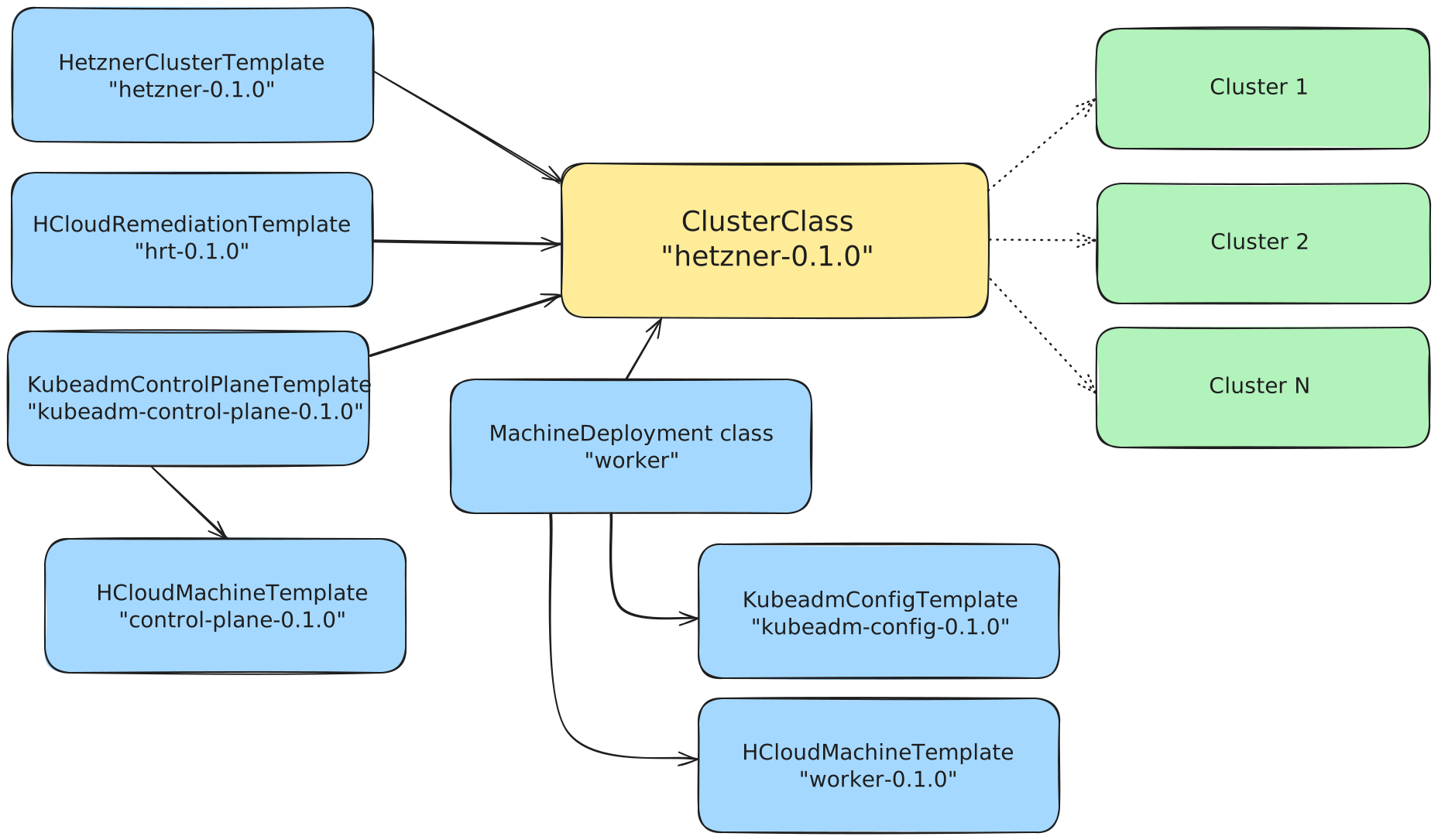
So with ClusterClass you configure a class of clusters (hence the name) which can be easily reused but also enhanced with cluster-specific variables and overrides.
Some fields in the template-related Custom Resources of Cluster API are immutable and can't be changed when you just want to replace the instance type or image name, for example.
Cluster API recommends deploying another resource with the new fields, let CAPI reconcile it and then remove the old one. But with ClusterClass, you can think of it like a template of different Cluster topology setups.
You reference other templates:
KubeadmControlPlaneTemplateKubeadmConfigTemplateHetznerClusterTemplateHCloudMachineTemplate
and then point to the ClusterClass in your Cluster manifest.
With clever variables and overrides, you will then have one central file (the Cluster) where you can set the Kubernetes version, HCloud images and instance types. This makes it straightforward to update your K8s Cluster like this:
- Create a new HCloud image
- Update the Kubernetes Version and image name
- Push to git and let CAPI reconcile everything
- .. Profit!
So how does a ClusterClass look like? Below you see a fully working manifest. You would add even more variables and patches (maybe for the location and other parameters) but it's already quite a huge block, so lets unpack it.
apiVersion: cluster.x-k8s.io/v1beta1
kind: ClusterClass
metadata:
  name: hetzner-0.1.0
spec:
  variables:
    - name: imageName
      required: true
      schema:
        openAPIV3Schema:
          type: string
    - name: instanceType
      required: true
      schema:
        openAPIV3Schema:
          type: string
  patches:
    - name: worker
      definitions:
        - jsonPatches:
            - op: replace
              path: /spec/template/spec/imageName
              valueFrom:
                variable: imageName
            - op: replace
              path: /spec/template/spec/type
              valueFrom:
                variable: instanceType
          selector:
            apiVersion: infrastructure.cluster.x-k8s.io/v1beta1
            kind: HCloudMachineTemplate
            matchResources:
              machineDeploymentClass:
                names:
                  - worker
    - name: control-plane
      definitions:
        - jsonPatches:
            - op: replace
              path: /spec/template/spec/imageName
              valueFrom:
                variable: imageName
            - op: replace
              path: /spec/template/spec/type
              valueFrom:
                variable: instanceType
          selector:
            apiVersion: infrastructure.cluster.x-k8s.io/v1beta1
            kind: HCloudMachineTemplate
            matchResources:
              controlPlane: true
  controlPlane:
    ref:
      apiVersion: controlplane.cluster.x-k8s.io/v1beta1
      kind: KubeadmControlPlaneTemplate
      name: kubeadm-control-plane-0.1.0
    machineInfrastructure:
      ref:
        apiVersion: infrastructure.cluster.x-k8s.io/v1beta1
        kind: HCloudMachineTemplate
        name: control-plane-0.1.0
    machineHealthCheck:
      maxUnhealthy: 100%
      nodeStartupTimeout: 15m
      remediationTemplate:
        apiVersion: infrastructure.cluster.x-k8s.io/v1beta1
        kind: HCloudRemediationTemplate
        name: hrt-0.1.0
      unhealthyConditions:
        - status: Unknown
          timeout: 180s
          type: Ready
        - status: "False"
          timeout: 180s
          type: Ready
  infrastructure:
    ref:
      apiVersion: infrastructure.cluster.x-k8s.io/v1beta1
      kind: HetznerClusterTemplate
      name: hetzner-0.1.0
  workers:
    machineDeployments:
    - class: worker
      failureDomain: fsn1
      template:
        bootstrap:
          ref:
            apiVersion: bootstrap.cluster.x-k8s.io/v1beta1
            kind: KubeadmConfigTemplate
            name: kubeadm-config-0.1.0
        infrastructure:
          ref:
            apiVersion: infrastructure.cluster.x-k8s.io/v1beta1
            kind: HCloudMachineTemplate
            name: worker-0.1.0
      machineHealthCheck:
        maxUnhealthy: 100%
        nodeStartupTimeout: 15m
        remediationTemplate:
          apiVersion: infrastructure.cluster.x-k8s.io/v1beta1
          kind: HCloudRemediationTemplate
          name: hrt-0.1.0
        unhealthyConditions:
          - status: Unknown
            timeout: 180s
            type: Ready
          - status: "False"
            timeout: 180s
            type: Ready
Variables
The variables define .. variables 😃 They are useful for things you want to set in your Cluster resource and may differ for different Clusters using the same ClusterClass.
We define two variables:
apiVersion: cluster.x-k8s.io/v1beta1
kind: ClusterClass
metadata:
  name: hetzner-0.1.0
spec:
  variables:
    - name: imageName
      required: true
      schema:
        openAPIV3Schema:
          type: string
    - name: instanceType
      required: true
      schema:
        openAPIV3Schema:
          type: string
  patches:
    - name: worker
... rest of the config ...imageName- Our HCloud image (we already built the image in Part 1 of the tutorial series) which will be used for all our nodesinstanceType- The HCloud instance type we want to set for our nodes. In a real-world example you might want to set even more variables for different machine deployments (more on that later)
Patches
Now the next part defines the patches where we use the variables we have defined. These are normal json patches which you might already be familiar with when working with Kustomize.
apiVersion: cluster.x-k8s.io/v1beta1
kind: ClusterClass
metadata:
  name: hetzner-0.1.0
spec:
  variables:
    - name: imageName
      required: true
      schema:
        openAPIV3Schema:
          type: string
    - name: instanceType
      required: true
      schema:
        openAPIV3Schema:
          type: string
  patches:
    - name: worker
      definitions:
        - jsonPatches:
            - op: replace
              path: /spec/template/spec/imageName
              valueFrom:
                variable: imageName
            - op: replace
              path: /spec/template/spec/type
              valueFrom:
                variable: instanceType
          selector:
            apiVersion: infrastructure.cluster.x-k8s.io/v1beta1
            kind: HCloudMachineTemplate
            matchResources:
              machineDeploymentClass:
                names:
                  - worker
    - name: control-plane
      definitions:
        - jsonPatches:
            - op: replace
              path: /spec/template/spec/imageName
              valueFrom:
                variable: imageName
            - op: replace
              path: /spec/template/spec/type
              valueFrom:
                variable: instanceType
          selector:
            apiVersion: infrastructure.cluster.x-k8s.io/v1beta1
            kind: HCloudMachineTemplate
            matchResources:
              controlPlane: true
  ... rest of the config ...
In every definition we set the path to patch of the resource referenced in the selector.
We have two group of patches: one for all our worker nodes and one for the control planes. The HCloudMachineTemplate we patch will be discussed later, but in short it defines how our Hetzner Cloud instances will be set up.
What's important to note here: be careful on how to match the controlPlane and the workers. For the control plane you configure matchResources to be controlPlane: true.
For the workers you target a specific machine deployment class, here we only have one which is simply called worker. Pay attention to match the exact name of the class specified in .spec.workers.machineDeployments.
Control Plane
In the next section we configure our controlPlane: we reference the KubeAdmControlPlaneTemplate (more on that later), where we set all configuration parameteres for kubeadm.
apiVersion: cluster.x-k8s.io/v1beta1
kind: ClusterClass
metadata:
  name: hetzner-0.1.0
spec:
  ... rest of the config ...
  controlPlane:
    ref:
      apiVersion: controlplane.cluster.x-k8s.io/v1beta1
      kind: KubeadmControlPlaneTemplate
      name: kubeadm
    machineInfrastructure:
      ref:
        apiVersion: infrastructure.cluster.x-k8s.io/v1beta1
        kind: HCloudMachineTemplate
        name: control-plane
    machineHealthCheck:
      maxUnhealthy: 100%
      nodeStartupTimeout: 15m
      remediationTemplate:
        apiVersion: infrastructure.cluster.x-k8s.io/v1beta1
        kind: HCloudRemediationTemplate
        name: hrt-0.1.0
      unhealthyConditions:
        - status: Unknown
          timeout: 180s
          type: Ready
        - status: "False"
          timeout: 180s
          type: Ready
  infrastructure:
  ... rest of the config ...
The machineInfrastructure references again the HCloudMachineTemplate for the control plane which we patched a few lines before. Next is our health check so CAPI knows if a machine is faulty and how it should handle this error.
We tell CAPI that a machine is unhealthy if the Status is either "Unknown" or "False" for at least 3min (180s). And the HCloudRemediationTemplate (we also will discuss this later) defines how the the faulty machine should be remediated - Spoiler: it will be replaced.
Infrastructure
At line 76 we define the infrastructure for our Hetzner Cluster with the HetznerClusterTemplate - which SSH Key to use, whether we want to use a private network and other Hetzner specific configuration.
apiVersion: cluster.x-k8s.io/v1beta1
kind: ClusterClass
metadata:
  name: hetzner-0.1.0
spec:
  ... rest of the config ...
  infrastructure:
    ref:
      apiVersion: infrastructure.cluster.x-k8s.io/v1beta1
      kind: HetznerClusterTemplate
      name: hetzner-0.1.0
  workers:
    machineDeployments:
  ... rest of the config ...
Workers
The last part is the configuration of our workers: similiar to the controlPlane part at line 52, we define KubeadmConfigTemplate, HCloudMachineTemplate and HCloudRemediationTemplate resources.
For simplicity we just define only one machine deployment class called "worker" in the HCloud region fsn1, but you're free to define as many machine deployments as you want or need.
apiVersion: cluster.x-k8s.io/v1beta1
kind: ClusterClass
metadata:
  name: hetzner-0.1.0
spec:
  ... rest of the config ...
  workers:
    machineDeployments:
    - class: worker
      failureDomain: fsn1
      template:
        bootstrap:
          ref:
            apiVersion: bootstrap.cluster.x-k8s.io/v1beta1
            kind: KubeadmConfigTemplate
            name: kubeadm-config-0.1.0
        infrastructure:
          ref:
            apiVersion: infrastructure.cluster.x-k8s.io/v1beta1
            kind: HCloudMachineTemplate
            name: worker
      machineHealthCheck:
        maxUnhealthy: 100%
        nodeStartupTimeout: 15m
        remediationTemplate:
          apiVersion: infrastructure.cluster.x-k8s.io/v1beta1
          kind: HCloudRemediationTemplate
          name: hrt-0.1.0
        unhealthyConditions:
          - status: Unknown
            timeout: 180s
            type: Ready
          - status: "False"
            timeout: 180s
type: ReadyCluster
The Cluster resource is where you define the values for variables defined in the ClusterClass. And as soon as you are deploying this resource the reconciliation loops will start and deploy all resources required for your Kubernetes cluster.
apiVersion: cluster.x-k8s.io/v1beta1
kind: Cluster
metadata:
  name: test
  labels:
    cloud: hetzner
    cni: cilium
    gitops: flux
spec:
  clusterNetwork:
    pods:
      cidrBlocks:
        - 10.200.0.0/16
    services:
      cidrBlocks:
        - 10.96.0.0/12
  topology:
    variables:
      - name: imageName
        value: cluster-api-flatcar-stable-4152.2.2-v1.32.4-1745487823
      - name: instanceType
        value: cx22
    class: hetzner-0.1.0
    version: v1.32.4
    controlPlane:
      replicas: 3
      variables:
        overrides:
          - name: imageName
            value: cluster-api-flatcar-stable-4152.2.2-v1.32.4-1745487823
          - name: type
            value: cx22
    workers:
      machineDeployments:
        - class: worker
          failureDomain: fsn1
          name: worker
          replicas: 2
          # do not set replicas when using cluster-autoscaler:
          # https://github.com/kubernetes/autoscaler/blob/master/cluster-autoscaler/cloudprovider/clusterapi/README.md#autoscaling-with-clusterclass-and-managed-topologies
          # metadata:
          #   annotations:
          #     cluster.x-k8s.io/cluster-api-autoscaler-node-group-min-size: "3"
          #     cluster.x-k8s.io/cluster-api-autoscaler-node-group-max-size: "5"
          #     cluster.x-k8s.io/autoscaling-options-scaledownutilizationthreshold: "0.7"
          #     capacity.cluster-autoscaler.kubernetes.io/taints: "cni.istio.io/not-ready"
Labels
For our Cluster we define three labels which are optional but useful to deploy Helm Charts via the CAAPH controller later:
cloud: hetzner: Deploy the HCCMcni: cilium: Deploy Ciliumgitops: flux: Deploy flux (not part of this tutorial)
Network
We start with the configuration of the network: Pod and Service CIDRs. We would configure variables and patches for these parameters in the ClusterClass as well, but for this tutorial we want to keep it simple.
apiVersion: cluster.x-k8s.io/v1beta1
kind: Cluster
metadata:
  name: test
spec:
  clusterNetwork:
    pods:
      cidrBlocks:
        - 10.200.0.0/16
    services:
      cidrBlocks:
        - 10.96.0.0/12
  topology:
  ... rest of the config ...
Topology
In the topology section we reference the variables we defined in our ClusterClass: imageName for the HCloud image and the instanceType.
Directly below we tell CAPI the name of ClusterClass we want to use for this Cluster and especially: what Kubernetes version to use - this needs to match with the HCloud images you build with image-builder!
Here we are using the Flatcar Linux image for our workers, but replace it with the OS and HCloud Snapshot name you created in the first part of the blog series.
apiVersion: cluster.x-k8s.io/v1beta1
kind: Cluster
metadata:
  name: test
spec:
  ... rest of the config ...
  topology:
    variables:
      - name: imageName
        value: cluster-api-flatcar-stable-4152.2.2-v1.32.4-1745487823
      - name: instanceType
        value: cx22
    class: hetzner-0.1.0
    version: v1.32.2
    controlPlane:
  ... rest of the config ...
Replicas
Beginning at line 25 we configure the replicas we want to use for our control plane: we set it to 3 to get high availability of course. Then follows the variable overrides where we configure what image and instance type the control plane nodes should use.
apiVersion: cluster.x-k8s.io/v1beta1
kind: Cluster
metadata:
  name: test
spec:
  ... rest of the config ...
  topology:
    variables:
  ... rest of the config ...
    class: hetzner-0.1.0
    version: v1.32.2
    controlPlane:
      replicas: 3
      variables:
        overrides:
          - name: imageName
            value: cluster-api-flatcar-stable-4152.2.2-v1.32.4-1745487823
          - name: type
            value: cx22
  ... rest of the config ...
Workers
At 33 comes the last part, the configuration of our machine deployments and replicas for our workers. Here again we reference the worker machine deployment class we configed in our ClusterClass (line 83). And, similiar to the control plane part, we configure the replicas - for our example Cluster two replicas are enough.
apiVersion: cluster.x-k8s.io/v1beta1
kind: Cluster
metadata:
  name: test
spec:
  ... rest of the config ...
    class: hetzner-0.1.0
    version: v1.32.2
    controlPlane:
  ... rest of the config ...
    workers:
      machineDeployments:
        - class: worker
          failureDomain: fsn1
          name: worker
          replicas: 2
          # do not set replicas when using cluster-autoscaler:
          # https://github.com/kubernetes/autoscaler/blob/master/cluster-autoscaler/cloudprovider/clusterapi/README.md#autoscaling-with-clusterclass-and-managed-topologies
          # metadata:
          #   annotations:
          #     cluster.x-k8s.io/cluster-api-autoscaler-node-group-min-size: "3"
          #     cluster.x-k8s.io/cluster-api-autoscaler-node-group-max-size: "5"
          #     cluster.x-k8s.io/autoscaling-options-scaledownutilizationthreshold: "0.7"
          #     capacity.cluster-autoscaler.kubernetes.io/taints: "cni.istio.io/not-ready"
For reference, I have also included some commented annotations. These will be interesting in the next parts of the series when we are using cluster-autoscaler to dynamically start/stop nodes, as well as setting a taint for new nodes which is recommended when using Istio in production.
Bootstrap - KubeadmConfigTemplate
Now, regarding how the new machines will be configured to join our cluster: we will use kubeadm and therefore have a KubeadmConfigTemplate for CAPI.
Here we define just same sane and secure defaults: safe TLS ciphers and version, no anonymous-auth, automatic certificate rotation.
For Hetzner Cloud its important to set cloud-provider --> external. This requires the deployment of the hcloud-cloud-controller-manager later.
No worries, we will do this in a CAPI-native and automatic fashion as well.
apiVersion: bootstrap.cluster.x-k8s.io/v1beta1
kind: KubeadmConfigTemplate
metadata:
  name: kubeadm-config-0.1.0
spec:
  template:
    spec:
      format: ignition # remove when using Ubuntu
      joinConfiguration:
        nodeRegistration:
          kubeletExtraArgs:
            anonymous-auth: "false"
            authentication-token-webhook: "true"
            authorization-mode: Webhook
            cloud-provider: external
            event-qps: "5"
            kubeconfig: /etc/kubernetes/kubelet.conf
            max-pods: "110"
            read-only-port: "0"
            rotate-server-certificates: "true"
            tls-cipher-suites: TLS_ECDHE_ECDSA_WITH_AES_128_GCM_SHA256,TLS_ECDHE_RSA_WITH_AES_128_GCM_SHA256,TLS_ECDHE_ECDSA_WITH_AES_256_GCM_SHA384,TLS_ECDHE_RSA_WITH_AES_256_GCM_SHA384
tls-min-version: VersionTLS12When this is not set, Cluster API will try to use cloud-init by default, which won't work for Flatcar. When using a different OS than Flatcar, just remove the format line or set the value to cloud-config (which is the default if not set).
Control Plane - KubeadmControlPlaneTemplate
Okay, this resource is huge and we can config a lot here. It tells kubeadm how our control plane nodes are set up.
Every config for every control plane component is here: apiserver, controller-manager, scheduler, etcd. Also, we set the etcd encryption config and DNS servers to be used.
This file is based on the great templates provided by CAPH — check out the CAPH hcloud cluster template.
apiVersion: controlplane.cluster.x-k8s.io/v1beta1
kind: KubeadmControlPlaneTemplate
metadata:
  name: kubeadm-control-plane-0.1.0
spec:
  template:
    spec:
      kubeadmConfigSpec:
        format: ignition # remove when using Ubuntu
        clusterConfiguration:
          apiServer:
            extraArgs:
              # CA certificate for validating API clients.
              client-ca-file: /etc/kubernetes/pki/ca.crt # enable X509 Client Certs Auth
              # TLS certificates for HTTPS serving.
              tls-cert-file: /etc/kubernetes/pki/apiserver.crt
              tls-private-key-file: /etc/kubernetes/pki/apiserver.key
              tls-cipher-suites: TLS_ECDHE_ECDSA_WITH_AES_128_GCM_SHA256,TLS_ECDHE_RSA_WITH_AES_128_GCM_SHA256,TLS_ECDHE_ECDSA_WITH_AES_256_GCM_SHA384,TLS_ECDHE_RSA_WITH_AES_256_GCM_SHA384
              tls-min-version: VersionTLS12
              # Required for kubelet communication.
              kubelet-client-certificate: /etc/kubernetes/pki/apiserver-kubelet-client.crt
              kubelet-client-key: /etc/kubernetes/pki/apiserver-kubelet-client.key
              # Secure communication to etcd servers.
              etcd-cafile: /etc/kubernetes/pki/etcd/ca.crt
              etcd-certfile: /etc/kubernetes/pki/etcd/server.crt
              etcd-keyfile: /etc/kubernetes/pki/etcd/server.key
              # Required to validate service account tokens created by controller manager.
              service-account-lookup: "true"
              service-account-key-file: /etc/kubernetes/pki/sa.pub
              # Required for aggregation layer
              requestheader-client-ca-file: /etc/kubernetes/pki/front-proxy-ca.crt
              proxy-client-key-file: /etc/kubernetes/pki/front-proxy-client.key
              proxy-client-cert-file: /etc/kubernetes/pki/front-proxy-client.crt
              requestheader-allowed-names: front-proxy-client
              requestheader-extra-headers-prefix: X-Remote-Extra-
              requestheader-group-headers: X-Remote-Group
              requestheader-username-headers: X-Remote-User
              enable-aggregator-routing: "true"
              # etcd Secret Encrytion
              encryption-provider-config: /etc/kubernetes/encryption-provider.yaml
              # Additional Configuration
              cloud-provider: external
              authorization-mode: "Node,RBAC"
              kubelet-preferred-address-types: ExternalIP,Hostname,InternalDNS,ExternalDNS
              profiling: "false"
              enable-bootstrap-token-auth: "true"
              default-not-ready-toleration-seconds: "45"
              default-unreachable-toleration-seconds: "45"
            extraVolumes:
              - name: encryption-provider
                hostPath: /etc/kubernetes/encryption-provider.yaml
                mountPath: /etc/kubernetes/encryption-provider.yaml
          controllerManager:
            extraArgs:
              cloud-provider: external
              cluster-signing-cert-file: /etc/kubernetes/pki/ca.crt
              cluster-signing-key-file: /etc/kubernetes/pki/ca.key
              cluster-signing-duration: 6h0m0s
              terminated-pod-gc-threshold: "10"
              profiling: "false"
              use-service-account-credentials: "true"
              service-account-private-key-file: /etc/kubernetes/pki/sa.key
              root-ca-file: /etc/kubernetes/pki/ca.crt
              requestheader-client-ca-file: /etc/kubernetes/pki/front-proxy-ca.crt
              kubeconfig: /etc/kubernetes/controller-manager.conf
              authentication-kubeconfig: /etc/kubernetes/controller-manager.conf
              authorization-kubeconfig: /etc/kubernetes/controller-manager.conf
              bind-address: "0.0.0.0"
              secure-port: "10257"
              allocate-node-cidrs: "true"
          scheduler:
            extraArgs:
              profiling: "false"
              kubeconfig: /etc/kubernetes/scheduler.conf
              bind-address: "0.0.0.0"
              secure-port: "10259"
          etcd:
            local:
              dataDir: /var/lib/etcd
              extraArgs:
                cipher-suites: TLS_ECDHE_ECDSA_WITH_AES_128_GCM_SHA256,TLS_ECDHE_RSA_WITH_AES_128_GCM_SHA256,TLS_ECDHE_ECDSA_WITH_AES_256_GCM_SHA384,TLS_ECDHE_RSA_WITH_AES_256_GCM_SHA384
                tls-min-version: TLS1.2
                cert-file: /etc/kubernetes/pki/etcd/server.crt
                key-file: /etc/kubernetes/pki/etcd/server.key
                client-cert-auth: "true"
                auto-tls: "false"
                peer-client-cert-auth: "true"
                peer-auto-tls: "false"
                trusted-ca-file: /etc/kubernetes/pki/etcd/ca.crt
        initConfiguration:
          nodeRegistration:
            kubeletExtraArgs:
              cloud-provider: external
              tls-cipher-suites: TLS_ECDHE_ECDSA_WITH_AES_128_GCM_SHA256,TLS_ECDHE_RSA_WITH_AES_128_GCM_SHA256,TLS_ECDHE_ECDSA_WITH_AES_256_GCM_SHA384,TLS_ECDHE_RSA_WITH_AES_256_GCM_SHA384
              tls-min-version: VersionTLS12
              kubeconfig: /etc/kubernetes/kubelet.conf
              authentication-token-webhook: "true"
              authorization-mode: Webhook
              anonymous-auth: "false"
              read-only-port: "0"
              event-qps: "5"
              rotate-server-certificates: "true"
              max-pods: "110"
              resolv-conf: /etc/kubernetes/resolv.conf
        joinConfiguration:
          nodeRegistration:
            kubeletExtraArgs:
              cloud-provider: external
              tls-cipher-suites: TLS_ECDHE_ECDSA_WITH_AES_128_GCM_SHA256,TLS_ECDHE_RSA_WITH_AES_128_GCM_SHA256,TLS_ECDHE_ECDSA_WITH_CHACHA20_POLY1305,TLS_ECDHE_RSA_WITH_AES_256_GCM_SHA384,TLS_ECDHE_RSA_WITH_CHACHA20_POLY1305,TLS_ECDHE_ECDSA_WITH_AES_256_GCM_SHA384,TLS_RSA_WITH_AES_256_GCM_SHA384,TLS_RSA_WITH_AES_128_GCM_SHA256
              kubeconfig: /etc/kubernetes/kubelet.conf
              authentication-token-webhook: "true"
              authorization-mode: Webhook
              anonymous-auth: "false"
              read-only-port: "0"
              event-qps: "5"
              rotate-server-certificates: "true"
              max-pods: "110"
              resolv-conf: /etc/kubernetes/resolv.conf
        files:
          - path: /etc/kubernetes/encryption-provider.yaml
            contentFrom:
              secret:
                key: encryptionconfig.yaml
                name: encryption-config
            owner: "root:root"
            permissions: "0600"
          - path: /etc/kubernetes/resolv.conf
            owner: "root:root"
            permissions: "0744"
            content: |
              nameserver 1.1.1.1
              nameserver 1.0.0.1
              nameserver 2606:4700:4700::1111
We won't go over every single configuration parameter, it would simply too much for a single blog post.
All the parameters map to the respective component's parameters. I will provide you with the direct links below for easy reference:
Lots of parameters are defining paths and configs for all the required certificates (which Kubernetes, rightly so, uses a lot). Don't get scared, CAPI will take care of everything for you 😊.
Two other important configs are the encryption at rest configuration (see next section) and the DNS servers.
Here we just configure the CloudFlare DNS servers, but you can use your favorite DNS provider of choice.
Encryption at rest Secret
An important section is the encryption at rest part, where we configure the EncryptionConfiguration resource.
Here we tell Kubernetes that some resources (in our case: Kubernetes Secrets) are stored encrypted in etcd.
Here you find an example, but PLEASE ADAPT TO YOUR NEEDS (especially the encryption key 😬).
You can generate a unique key with openssl:
openssl rand -base64 32Then put your key (plain, do not base64-encode yet) into your encryption-provider.yaml:
apiVersion: apiserver.config.k8s.io/v1
kind: EncryptionConfiguration
resources:
  - resources:
      - secrets
    providers:
      - secretbox:
          keys:
            - name: key1
              secret: my-super-secret-changethisplz
- identity: {}- resources: The encryption-at-rest should be applied for secret resources (others would be possible as well, check the official docs for more info)
- providers: The secretbox provider is used, which is safe and fast
- keys: One key named
key1is defined. If you want to roll the encryption keys (which you should!), you would define a second one and then reencrypt the Secrets with the new one before removing the old key
Last step is to create a Kubernetes Secret from your EncryptionConfiguration:
kubectl create secret generic encryption-config \
  --from-file=encryptionconfig.yaml=encryption-provider.yaml
Infrastructure - HetznerClusterTemplate
As the name implies, this is Hetzner specific and configures various aspects like Hetzner Cloud regions to be used, private network, SSH Key, Placement Groups and the Secret where your HCloud Token is provided.
apiVersion: infrastructure.cluster.x-k8s.io/v1beta1
kind: HetznerClusterTemplate
metadata:
  name: hetzner-0.1.0
spec:
  template:
    spec:
      controlPlaneEndpoint:
        host: ""
        port: 443
      controlPlaneLoadBalancer:
        region: fsn1
      controlPlaneRegions:
        - fsn1
        - hel1
        - nbg1
      hcloudNetwork:
        enabled: true
        networkZone: eu-central
      hcloudPlacementGroups:
        - name: control-plane
          type: spread
        - name: worker
          type: spread
      hetznerSecretRef:
        key:
          hcloudToken: hcloud
        name: hetzner
      sshKeys:
        hcloud:
          - name: id_ed25519
Control Plane & Network
We want our Control Plane to be available at port 443 and the Hetzner Cloud Load Balancer for the Kubernetes API to be in the Falkenstein region (fsn1).
But the Control Plane nodes itself should be spread across multiple regions. Here we set all three european regions of Hetzner.
To keep everything private, we leverage Private Networks and set them to the eu-central european network zone.
Placement Groups
Hetzner provides so called "Placement Groups", which help influencing the distribution of your servers. With the "spread" placement type, we make sure that our instances are all running on different physical servers.
Hetzner Credentials
The last part defines the Kubernetes Secret with your Hetzner Cloud API Token. This needs to be available before you deploy your CAPI Cluster.
We create a Kubernetes Secret named hetzner with the key hcloud where our token is stored:
# keep trailing space to not expose token in your shell history
 export HCLOUD_TOKEN="your-hcloud-token"

kubectl create secret generic hetzner \
  --from-literal=hcloud=$HCLOUD_TOKEN
The SSH Key named id_ed25519 is the one you have configured in your HCloud project. Check HCloud Console > Security > SSH Keys for your key name and update the YAML accordingly.
Infrastructure - HCloudMachineTemplate
We are using two different HMTs (short for HCloudMachineTemplate) here:
- Control Plane
- Workers
Notice that the value for imageName just says "PLACEHOLDER": together with the value for type it will be set in the Cluster resource via our variable overrides.
apiVersion: infrastructure.cluster.x-k8s.io/v1beta1
kind: HCloudMachineTemplate
metadata:
  name: worker-0.1.0
spec:
  template:
    metadata:
      labels:
        type: worker
    spec:
      imageName: PLACEHOLDER
      placementGroupName: worker
      type: cx32   # will be replaced by variable override, but needs to be a legit hcloud instance type
      publicNetwork:
        enableIPv4: true
        enableIPv6: true
apiVersion: infrastructure.cluster.x-k8s.io/v1beta1
kind: HCloudMachineTemplate
metadata:
  name: control-plane-0.1.0
spec:
  template:
    metadata:
      labels:
        type: control-plane
    spec:
      imageName: PLACEHOLDER
      placementGroupName: control-plane
      type: cx32   # will be replaced by variable override, but needs to be a legit hcloud instance type
      publicNetwork:
        enableIPv4: true
        enableIPv6: true
Infrastructure - HCloudRemediationTemplate
For simplicity, we are using just one HRTs (short for HCloudRemediationTemplate) for control plane and worker nodes.
If a healthcheck for an instance fails, the HRT configures what should happen: we will reboot the instance.
The ClusterClass resource defines the healthchecks and references this HRT. In the background, CAPI looks at the status field of a machine resource and decides depending on whats defined in the ClusterClass when a machine is not healthy anymore.
When the Ready status is "False" or "Unknown", then the check fails and the HRT will cause the machine to be rebooted.
apiVersion: infrastructure.cluster.x-k8s.io/v1beta1
kind: HCloudRemediationTemplate
metadata:
  name: hrt-0.1.0
spec:
  template:
    spec:
      strategy:
        retryLimit: 1
        timeout: 180s
        type: Reboot
Helm Charts
Wow, you made it until here. 👏
What follows now is the deployment of a networking solution (Cilium) and our cloud controller manager for Hetzner (HCCM). Both are required, or otherwise our CAPI Clusters will never get ready.
For both deployments to be automated, we have previously deployed the CAAPH provider. It allows us to create HelmChartProxy resources in our management cluster and CAPI will deploy the Helm Charts into the workload clusters.
Remember in the Cluster Labels section we defined some labels to attach to the Cluster resource?
These labels are now used to control what Helm Charts should be deployed to what kind of Clusters.
HCloud Cloud Controller Manager (HCCM)
The HCCM talks to the Hetzner Cloud API and is used for networking or when deploying a Kubernetes Service type: LoadBalancer. HCCM will create a cloud load balancer for you and points it to your Service.
apiVersion: addons.cluster.x-k8s.io/v1alpha1
kind: HelmChartProxy
metadata:
  name: hccm-hetzner-0.1.0
spec:
  clusterSelector:
    matchLabels:
      cloud: hetzner
  repoURL: https://charts.hetzner.cloud
  chartName: hcloud-cloud-controller-manager
  version: 1.23.0
  namespace: kube-system
  valuesTemplate: |
    env:
      HCLOUD_LOAD_BALANCERS_DISABLE_PRIVATE_INGRESS:
        value: "true"
      HCLOUD_LOAD_BALANCERS_USE_PRIVATE_IP:
        value: "true"
      HCLOUD_NETWORK_ROUTES_ENABLED:
        value: "false"
      HCLOUD_TOKEN:
        valueFrom:
          secretKeyRef:
            name: hetzner-test
            key: hcloud
    networking:
      enabled: true
      clusterCIDR: 10.200.0.0/16
      network:
        valueFrom:
          secretKeyRef:
            name: hetzner-test
            key: network
    additionalTolerations:
    - key: "node.cluster.x-k8s.io/uninitialized"
      operator: "Exists"
      effect: "NoSchedule"
The secret name referenced under networking and for HCLOUD_TOKEN needs to match the Kubernetes Secret you created earlier.
Cluster Selector
apiVersion: addons.cluster.x-k8s.io/v1alpha1
kind: HelmChartProxy
metadata:
  name: hccm-hetzner-0.1.0
spec:
  clusterSelector:
    matchLabels:
      cloud: hetzner
  ... rest of the config ...
To let CAPI know on what Clusters to install this Helm Chart, we match on the cloud: hetzner label we defined in our Cluster resource earlier.
Chart config
apiVersion: addons.cluster.x-k8s.io/v1alpha1
kind: HelmChartProxy
metadata:
  name: hccm-hetzner-0.1.0
spec:
  ... rest of the config ...
  repoURL: https://charts.hetzner.cloud
  chartName: hcloud-cloud-controller-manager
  version: 1.23.0
  namespace: kube-system
  valuesTemplate: |
  ... rest of the config ...
Then follows the standard Helm Chart parameters: the Helm Chart repository, Chart name, version and Namespace to be deployed into.
Values
apiVersion: addons.cluster.x-k8s.io/v1alpha1
kind: HelmChartProxy
metadata:
  name: hccm-hetzner-0.1.0
spec:
  ... rest of the config ...
  valuesTemplate: |
    env:
      HCLOUD_LOAD_BALANCERS_DISABLE_PRIVATE_INGRESS:
        value: "true"
      HCLOUD_LOAD_BALANCERS_USE_PRIVATE_IP:
        value: "true"
      HCLOUD_NETWORK_ROUTES_ENABLED:
        value: "false"
      HCLOUD_TOKEN:
        valueFrom:
          secretKeyRef:
            name: hetzner
            key: hcloud
    networking:
      enabled: true
      clusterCIDR: 10.200.0.0/16
      network:
        valueFrom:
          secretKeyRef:
            name: hetzner
            key: network
    additionalTolerations:
    - key: "node.cluster.x-k8s.io/uninitialized"
      operator: "Exists"
      effect: "NoSchedule"
The rest is just some Helm values for the Chart. We define some global variables for all LoadBalancers, which can be overwritten by annotations on the Kubernetes Services itself. Important is the cluster CIDR which needs to match the one in the Cluster's networking config.
Cilium (CNI)
Our Kubernetes cluster also needs to have some networking and we are going to use Cilium: battle tested, widely used (AWS, GCP) and with fantastic features (for instance, the Host Firewall).
apiVersion: addons.cluster.x-k8s.io/v1alpha1
kind: HelmChartProxy
metadata:
  name: cilium-hetzner-0.1.0
spec:
  clusterSelector:
    matchLabels:
      cni: cilium
  repoURL: https://helm.cilium.io/
  chartName: cilium
  version: 1.14.4
  namespace: kube-system
  options:
    waitForJobs: true
    wait: true
    timeout: 5m
  valuesTemplate: |
    cni:
      exclusive: false # required for istio-cni

    rollOutCiliumPods: true
    priorityClassName: "system-node-critical"

    hostFirewall:
      enabled: true

    hubble:
      metrics:
        enabled:
          - dns:query;ignoreAAAA
          - drop
          - tcp
          - flow
          - icmp
          - http
      relay:
        enabled: true
        rollOutPods: true
      ui:
        enabled: true
        rollOutPods: true
    ipam:
      mode: "kubernetes"

    kubeProxyReplacement: "partial"

    operator:
      rollOutPods: true
      priorityClassName: "system-node-critical"
For the labels and Helm Chart configuration, it's the same as for HCCM but adapted for Cilium.
More important are the values: if you plan to use Istio later, cni.exclusive needs to be --> false.
Host Firewall and Hubble metrics are also enabled for better observability. If you don’t need them, feel free to disable them individually or both.
Flux
I added all the resources above in a GitHub repository which you can use and play around with:

Keep two things in mind:
- You need to create the discussed Secrets for the EncyptionConfiguration and Hetzner Token
- Update the lines with the
# replace mecomment
apiVersion: source.toolkit.fluxcd.io/v1
kind: GitRepository
metadata:
  name: hajowieland-blog-material
spec:
  interval: 5m
  url: https://github.com/hajowieland/blog-material
  ref:
    branch: main
---
apiVersion: kustomize.toolkit.fluxcd.io/v1
kind: Kustomization
metadata:
  name: test-cluster
spec:
  interval: 10m
  patches:
  - patch: |-
      apiVersion: infrastructure.cluster.x-k8s.io/v1beta1
      kind: HetznerClusterTemplate
      metadata:
        name: hetzner-0.1.0
      spec:
        template:
          spec:
            sshKeys:
              hcloud:
                - name: your-hetzner-ssh-key-name # replace me
  - patch: |-
      apiVersion: cluster.x-k8s.io/v1beta1
      kind: Cluster
      metadata:
        name: test
      spec:
        topology:
          variables:
            - name: imageName
              value: cluster-api-flatcar-stable-4152.2.2-v1.32.4-1745487823 # replace me
            - name: instanceType
              value: cx22
          version: v1.32.4 # replace me
          controlPlane:
            variables:
              overrides:
                - name: imageName
                  value: cluster-api-flatcar-stable-4152.2.2-v1.32.4-1745487823 # replace me
                - name: instanceType
                  value: cx22
  sourceRef:
    kind: GitRepository
    name: hajowieland-blog-material
  path: "./cluster-api-on-hetzner-with-clusterclass/resources"
  prune: true
  timeout: 1m
Notes
Some important notes I want to add for you about issues I stumbled upon during development.
HCloud IPs blocked
Some Hetzner Cloud IPs are blacklisted which might result in issues when a new node tries to retrieve container images from registry.k8s.io and results in a "403 Forbidden". Sadly, you can't to anything about it - see this Issue.
Flatcar SSH
When you want to SSH into one of your Flatcar Linux instances, you need to use the core user instead of root like on Ubuntu.
Next
So congratulations, you now have your first workload cluster deployed with Cluster API! In the next part, we will focus on an advanced use case:
Running your control plane as Pods and getting a managed Kubernetes service like experience.