
Deploy Cluster API Operator and Providers with Flux
How to declaratively deploy cluster-api-operator and CAPI providers with gitOps
Updated
On this page
Here in Part 2 of the series, we're deploying Cluster API itself: but not iteratively of course, but in a declarative, gitOps fashion with the help of Flux.
Part 1: "Build conformant Cluster API Node Images for Hetzner Cloud"
- Create conformant Cluster API images for Hetzner Cloud with kubernetes-sigs/image-builder
- Flatcar and Ubuntu Linux
Part 2: (you are here)
- Deploy Cluster API Operator
- Deploy Custom Resources (CAPI Providers)
Part 3: "Dive into Cluster API, ClusterClass and CAPH"
- Overview of all CAPI related resources and templates
- Deployment of highly available, multi-region Kubernetes Cluster with Cluster API
- Usage of Cluster API ClusterClass as a template for your Hetzner Cloud Clusters
Part 4: "Kamaji, Cluster API and etcd"
- Deploy Kamaji and run your control plane as Pods
- Deploy the Kamaji Control Plane provider for Cluster API
- Create etcds with kamaji-etcd
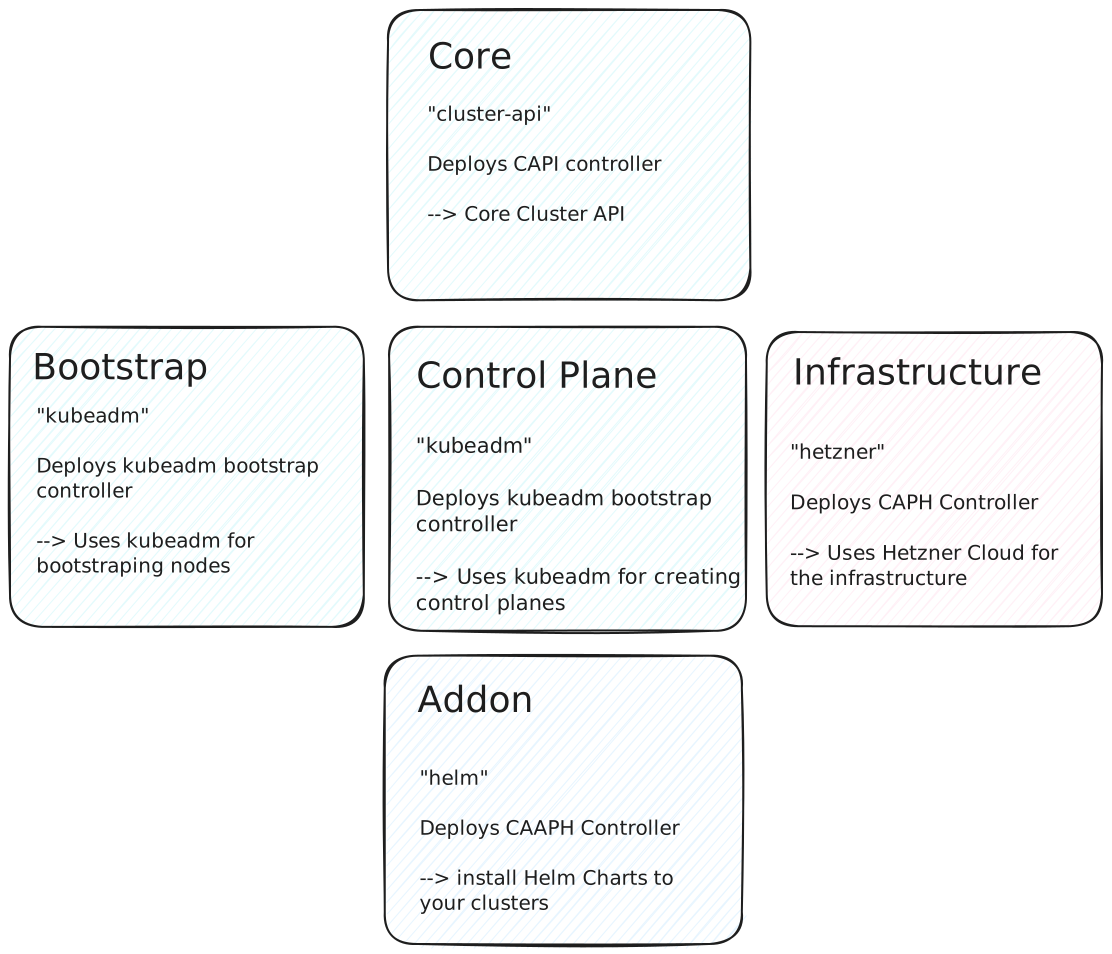
As the Operator currently is mainly supporting ArgoCD which you can see in the sync-wave annotations in the Operator's Helm Chart, we need to be careful on how we deploy the CAPI Operators and its Custom Resources.
Deploy CRDs and cluster-api-operator
As it's a recommended best-practice, which you should follow not only for the CAPI Operator, but for all components that are using CRDs:
--> deploy the CRDs first and then the application itself
This helps with installing dependent resources (Custom Resources need the CRD to be available first), upgrading them and with the overall management of CRDs in your clusters.
With the CAPI Operator, you can choose between two deployment modes:
- Use the release artifact, which bundles everything in one file
- Use the Helm Chart
If an official Chart is available, I mostly prefer using it to deploy an application. But here I chose to go with the release artifact as the deployment with a Flux HelmRelease will fail. The Chart's helm hooks to deploy the Custom Resources (the CAPI providers) won't work with Flux out of the box: the CRDs are not yet available when flux tries to deploy the CRs. The workaround mentioned in this comment did not work for me either.
So after some fiddling around, I decided its easier and more maintenanble ("K.I.S.S.") to just use the release artifact instead of the buggy Chart with Flux.
We can easily deploy all resources with this small kustomization - it also contains a Renovate comment directive so an update PR will created automatically for new releases:
apiVersion: kustomize.config.k8s.io/v1beta1
kind: Kustomization

resources:
  # renovate: datasource=github-releases depName=kubernetes-sigs/cluster-api-operator
  - https://github.com/kubernetes-sigs/cluster-api-operator/releases/download/v0.17.1/operator-components.yaml
Kustomize will make sure that the CRDs are deployed first and everything else that depend on them afterward.
Deploy CAPI Providers
Our Operator should now be ready, and we can start deploying the Cluster API providers with the desired versions and configs.
As the Providers are just Custom Resources as well, we configure everything in a Kubernetes-native way. So let's go through them one by one.
Core
apiVersion: operator.cluster.x-k8s.io/v1alpha2
kind: CoreProvider
metadata:
  name: cluster-api
spec:
  version: v1.9.6  # Cluster API version
  manager:
    featureGates:  # Optional feature gates we want to configure
      ClusterResourceSet: true
      ClusterTopology: true
      KubeadmBootstrapFormatIgnition: true
      MachinePool: true
      MachineSetPreflightChecks: false
RuntimeSDK: false- Deploy core Cluster API controller ("capi-controller")
- Check version in kubernetes-sigs/cluster-api
- We enable some experimental features
Our goal is to use ClusterClass, Flatcar Linux and deploy a Secret/ConfigMap from our management cluster to the workload clusters. For this to work, we need to enable the ClusterTopology feature gate so we can utilize ClusterClass resources as an abstraction over Clusters.
As Flatcar Linux uses Ignition instead of cloud-init to for bootstraping the nodes, we need to enable KubeadmBootstrapFormatIgnition here and in the kubeadm bootstrap resource further below.
And finally, we enable ClusterResourceSet to be able sync a Secret or ConfigMap to our clusters.
This can come in handy when we want to sync Secrets/ConfigMaps from our management cluster automatically to all (or subset of) our workload clusters.
Bootstrap
apiVersion: operator.cluster.x-k8s.io/v1alpha2
kind: BootstrapProvider
metadata:
  name: kubeadm
spec:
  version: v1.9.6
  manager:
    featureGates:
KubeadmBootstrapFormatIgnition: true- Deploy kubeadm bootstrap controller ("capi-kubeadm-bootstrap")
- Check version in the core repo: kubernetes-sigs/cluster-api
- We also enable Ignition bootstrap format like in the Core provider
ControlPlane
apiVersion: operator.cluster.x-k8s.io/v1alpha2
kind: ControlPlaneProvider
metadata:
  name: kubeadm
spec:
  version: v1.9.6
  manager:
    featureGates:
      MachinePool: true
      ClusterTopology: true
KubeadmBootstrapFormatIgnition: true- Deploy kubeadm controlplane controller ("capi-kubeadm-control-plane")
- Check version in the core repo: kubernetes-sigs/cluster-api
- We also enable Ignition bootstrap format like in the Core provider
Infrastructure
apiVersion: operator.cluster.x-k8s.io/v1alpha2
kind: InfrastructureProvider
metadata:
  name: hetzner
spec:
version: v1.0.2 # CAPH version- Deploy Hetzner infrastructure provider ("caph-controller")
- Check version in the CAPH repo: syself/cluster-api-provider-hetzner
Addon
apiVersion: operator.cluster.x-k8s.io/v1alpha2
kind: AddonProvider
metadata:
  name: helm
spec:
version: v0.3.1 # CAAPH version- Deploy Helm addon provider ("caaph-controller")
- Check version in the CAAPH repo: kubernetes-sigs/cluster-api-addon-provider-helm
Flux
So where is Flux in all of this? I tried to make it as general as possible, so that it would work with other gitOps tools (ArgoCD) as well.
What follows is an example Flux Kustomization & GitRepository for all resources shown in this blog post.

apiVersion: source.toolkit.fluxcd.io/v1
kind: GitRepository
metadata:
  name: hajowieland-blog-material
spec:
  interval: 5m
  url: https://github.com/hajowieland/blog-material
  ref:
    branch: main
---
apiVersion: kustomize.toolkit.fluxcd.io/v1
kind: Kustomization
metadata:
  name: capi-operator
spec:
  interval: 10m
  sourceRef:
    kind: GitRepository
    name: hajowieland-blog-material
  path: "./deploy-cluster-api-operator-providers-with-flux/capi-operator"
  prune: true
  timeout: 1m
---
apiVersion: kustomize.toolkit.fluxcd.io/v1
kind: Kustomization
metadata:
  name: capi-operator-providers
spec:
  dependsOn:
    - name: capi-operator
  interval: 10m
  sourceRef:
    kind: GitRepository
    name: hajowieland-blog-material
  path: "./deploy-cluster-api-operator-providers-with-flux/capi-operator/providers"
  prune: true
  timeout: 1m
Next
Now our Cluster API setup is complete, and in the next part of this series we will deploy our first Cluster.